
Email remains one of the most powerful tools in modern business. Yet, for professionals who rely on communication to build relationships, sell services, or manage clients, simply sending an email isn’t enough. You need to know what happens after you hit “send.”
That’s where Mailsuite comes in — a tool designed to make your emails smarter, trackable, and more effective. But is it actually worth using? Let’s explore its features, advantages, and real-world value to find out.
What is Mailsuite?
Mailsuite (previously known as Mailtrack) is an email-tracking and productivity extension built for Gmail and Outlook users. It helps you know when your emails are opened, how often, and even whether the links inside were clicked.
The tool adds a layer of visibility that standard email platforms lack. For professionals, this can mean the difference between following up strategically — or missing an opportunity altogether.
Since its creation, Mailsuite has expanded beyond simple tracking into a more complete suite for productivity, offering tools like scheduling, templates, and team analytics.
Core Features That Stand Out
Mailsuite includes several functions that make it more than just a “read receipt” app. Each feature works to improve communication efficiency and awareness.
Real-Time Email Tracking
Mailsuite tracks when your email is opened, how many times it’s been viewed, and whether it was read on desktop or mobile. Every time the recipient opens your message, you receive a discreet notification.
This is especially useful in sales or outreach — you’ll know exactly when someone is showing interest and when to follow up. It also helps gauge if your subject lines and message timing are effective.
Link and Attachment Tracking
Beyond simple opens, Mailsuite lets you see if your recipient clicked a link or opened an attachment. This gives you deeper insight into what part of your message caught their attention.
For example, if a prospect opens a proposal link several times, that’s a clear sign they’re seriously considering your offer. Knowing this helps you time your next message perfectly.
Email Scheduling and Reminders
Timing is everything in communication. Mailsuite allows you to schedule messages to be sent later — ideal for reaching people during work hours or different time zones.
You can also set up follow-up reminders so you never forget to check in with a lead who hasn’t replied. This feature is a quiet productivity booster that helps you maintain consistent communication habits.
Templates and Signatures
If you send similar types of emails frequently — proposals, pitches, or updates — Mailsuite’s template system saves time. You can create and reuse professional, branded messages that maintain a consistent tone.
The custom signature feature ensures that every email carries your brand identity, helping you appear polished and reliable.
Team and Analytics Dashboard
For businesses, Mailsuite provides shared dashboards where teams can view collective email performance. Managers can track who is sending what, open rates, and engagement metrics.
It’s a practical way to improve team efficiency, identify what’s working, and provide data-backed feedback for better outreach strategies.
Pricing and Plans
Mailsuite offers both free and paid versions.
The free plan covers unlimited email tracking — something rare in similar tools. However, features like link tracking, full analytics history, and campaign management are available in paid plans such as Pro and Advanced tiers.
When compared with other email tracking services, Mailsuite’s pricing remains reasonable, especially considering its Gmail integration and unlimited tracking in the free plan. For small businesses or freelancers, it offers great entry-level value.
Real-World Advantages of Mailsuite
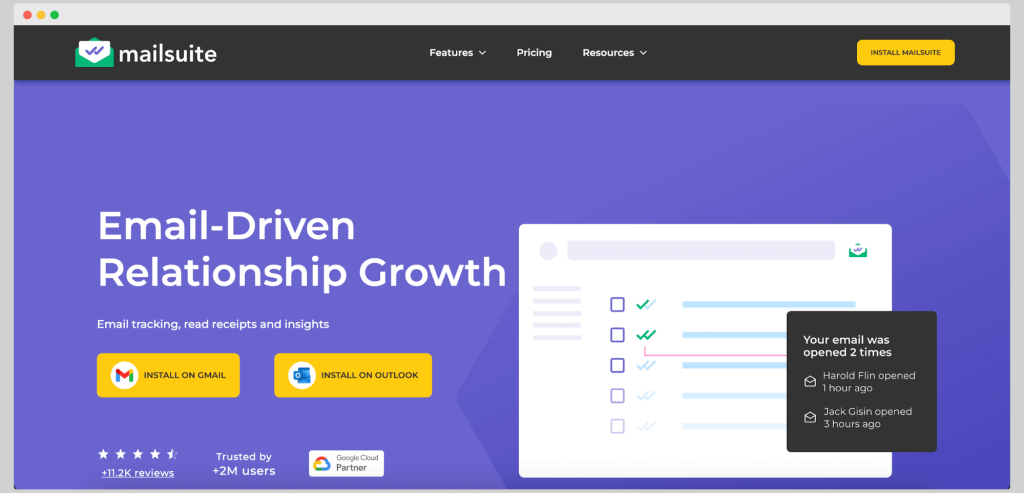
The true worth of a productivity tool lies in its real-world performance. Here’s how Mailsuite makes a difference for everyday users.
Smarter Follow-Ups
Imagine you send a proposal and see it was opened twice within the last hour. That’s your cue to send a gentle follow-up — not too early, not too late.
Mailsuite empowers you with this timing insight. Instead of guessing, you’re responding based on actual engagement, increasing the chances of getting a reply.
Better Lead Management
For sales professionals, tracking opens and clicks helps prioritize leads. If one prospect engages more than others, it’s logical to focus efforts there.
This data-driven approach helps teams spend time where it matters most, improving conversion rates without increasing workload.
Enhanced Team Collaboration
In a business environment, transparency and coordination matter. With shared analytics, teams can see who’s performing well and where improvement is needed.
Managers gain visibility into follow-up habits, message effectiveness, and response patterns — all essential for fine-tuning communication strategies.
Integration and Simplicity
Unlike some complex tools, Mailsuite works directly inside your Gmail or Outlook interface. There’s no need for a separate platform or dashboard.
This ease of use ensures even non-technical users can benefit immediately. It fits naturally into your existing workflow, making adoption painless.
Limitations to Consider
No tool is perfect, and Mailsuite has its limitations.
- Privacy Concerns: Because Mailsuite uses tracking pixels, some email clients or users may block them, affecting accuracy.
- Limited on Free Plan: The free plan lacks link tracking and detailed analytics, which professionals might need.
- Gmail/Outlook Dependency: Mailsuite is designed mainly for these two platforms, limiting options for users of other email systems.
These aren’t deal-breakers, but they’re important to know before committing long-term.
User Feedback and Reputation
Across review sites, Mailsuite generally receives positive ratings for reliability and simplicity. Users appreciate that it “just works” without unnecessary setup.
Salespeople, recruiters, and consultants especially value the real-time notifications that help them respond quickly to leads.
Some users, however, note occasional inaccuracies when recipients use strict privacy settings — a common challenge among all tracking tools.
Comparison with Competitors
When placed alongside tools like Yesware, Streak, or HubSpot Sales, Mailsuite stands out for its simplicity and affordability.
While other platforms may offer CRM integrations and complex analytics, they often come with higher subscription fees. Mailsuite focuses on doing one thing extremely well — giving you real-time visibility into your email activity.
Is Mailsuite Worth It?
For most professionals who rely heavily on email, the answer is yes.
Mailsuite’s blend of affordability, usability, and functionality makes it a strong choice. Whether you’re an independent freelancer trying to follow up with clients, or part of a sales team managing hundreds of emails daily, the benefits are tangible.
Its insights help you act with better timing, focus on engaged recipients, and save hours of guesswork. The free plan alone offers enough to transform how you approach your inbox — and the paid version expands those capabilities even further.
Final Thoughts
Mailsuite proves that simple, thoughtful technology can make a major difference in daily communication. By giving you clarity on when emails are opened, how recipients engage, and where to focus your energy, it turns guesswork into strategy.
Buzzlift: What Made Masako Katsura a Global Icon in Billiards
While it’s not flawless — no tracking system is — Mailsuite earns its reputation as one of the most practical tools for anyone who values precision and follow-through in digital communication.
If you send dozens of emails each week and wish you had more insight into what happens after hitting “send,” then yes — Mailsuite is worth using.